Header Bidding
PROIntegrate Prebid.js and other header bidding solutions to maximize your ad revenue.
What is Header Bidding?
Header bidding allows multiple ad exchanges to bid on your inventory simultaneously, increasing competition and potentially higher revenue. Instead of sequential waterfall bidding, all demand partners compete at once.
Revenue Impact
Publishers using header bidding with NoAdCode typically see +30-50% increase in header bidding revenue compared to standard implementations.
NoAdCode Advantage
Our ads are header bidding compliant - they work seamlessly with Prebid.js and ensure proper auction timing.
Supported Solutions
Prebid.js, Amazon TAM, and custom header bidding implementations are all supported.
Enabling Header Bidding
Access Header Bidding
Click NoAdCode → Header Bidding in your WordPress admin.
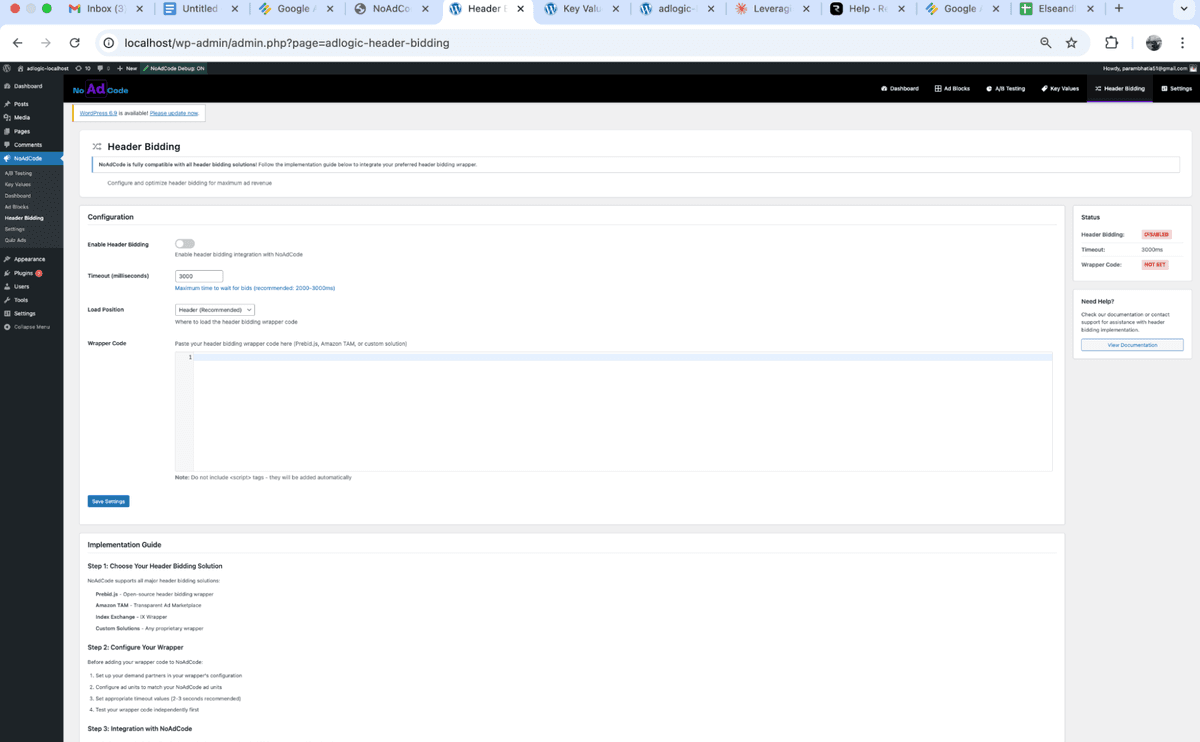
Enable Header Bidding
Toggle Enable Header Bidding to ON.
Adding Wrapper Code
Head Code Section
Paste your Prebid.js or header bidding wrapper code in the Head Code section. This code will be injected in the <head> before any ad code runs.
// Example Prebid.js Setup
var pbjs = pbjs || {};
pbjs.que = pbjs.que || [];

var adUnits = [{
    code: 'div-gpt-ad-123',
    mediaTypes: {
        banner: {
            sizes: [[300, 250], [300, 600]]
        }
    },
    bids: [{
        bidder: 'appnexus',
        params: {
            placementId: 12345
        }
    }, {
        bidder: 'rubicon',
        params: {
            accountId: 12345,
            siteId: 67890,
            zoneId: 11111
        }
    }]
}];
Note: Get your Prebid.js code from your ad ops team or use thePrebid.org configurator.
Footer Code Section (Optional)
Some header bidding setups require additional code at the bottom of the page. Add any footer scripts here.
How It Works with NoAdCode
Execution Order
- Your header bidding code runs first (from Head Code section)
- Prebid.js collects bids from all demand partners
- Bids are sent to GAM as key-values (hb_pb, hb_bidder, etc.)
- NoAdCode requests ads from GAM with bid information
- GAM compares bids with direct campaigns
- Highest bidder wins the impression
What NoAdCode Handles
- • GPT library loading and initialization
- • Ad slot definition and display
- • Refresh timing coordination
- • Key-value passing to GAM
What You Configure
- • Prebid.js ad units and bidders
- • Timeout settings
- • Price granularity
- • Bidder-specific parameters
Best Practices
Set Appropriate Timeouts
Use 1000-1500ms for desktop, 1500-2000ms for mobile to balance revenue and user experience.
Match Ad Unit Codes
Ensure your Prebid ad unit codes match your NoAdCode block IDs for proper bid matching.
Test in Staging First
Always test header bidding changes in a staging environment before going live.
Monitor Performance
Regularly check your GAM reports to ensure bids are being received and competing.
Common Issues
Bids Not Showing in GAM
- • Check that line items are set up in GAM with correct key-values (hb_pb, hb_bidder)
- • Verify your Prebid timeout isn't too short
- • Ensure bidder parameters are correct
Ads Loading Slowly
- • Reduce number of bidders (too many can slow down auctions)
- • Lower timeout settings
- • Check for JavaScript errors in console
Conflicting Scripts
- • Remove duplicate GPT library loads
- • Don't initialize GPT yourself - NoAdCode handles it
- • Check for other ad plugins that might conflict
Need Help?
If you run into issues with header bidding, check our troubleshooting guide or contact support.